Skip to content
100% offline / on-premise ADASH DDS .ndb databases Reports in Czech & English

From a vibration database
to a finished report
in a single afternoon.

HADS ingests the diagnostic database from ADASH DDS — the software that stores measurements captured with the ADASH VA5 instrument — and evaluates every measurement point against standards and your own limits, drafts a diagnostic conclusion with AI assistance and generates a customer-ready report in PDF and editable DOCX. No cloud, no package installation.

Pilot on your own database · 2 weeks · no changes to the measurement instrument

Machine card · Extraction fan V-04 · Bearings and limits
Motor – coupling sideMOT-1 · horizontal 1.12 mm/s A
Motor – fan sideMOT-2 · vertical 1.86 mm/s B
Fan – bearing AVEN-1 · horizontal 3.15 mm/s C
Fan – bearing BVEN-2 · acceleration envelope 0.86 gE D
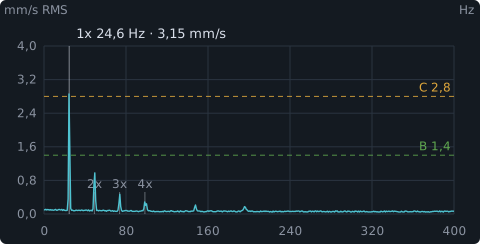
Vibration velocity spectrum with a dominant running-speed component and harmonics
Velocity FFT · 1× 24.6 Hz dominant · harmonic and ISO 20816-3 limit markers
.ndb

Reads ADASH DDS databases directly — no exports, no intermediate steps

3 versions

Concise customer report, detailed technical report and fan balancing protocol

4 standards

ISO 20816-3, ISO 14694, ČSN 20 0065 and your own catalogue

No cloud

Customer data stays on the diagnostician's computer

Key features

Everything a diagnostician needs between measurement and report delivery

HADS is not another spectrum viewer. It is a working environment where measured data becomes a decision — with standard-anchored limits, AI as an interpretation layer, and an output that can be sent to the customer without further editing.

Data flow: VA5, DDS, HADS Diagram of the data flow from the ADASH VA5 measurement instrument through the ADASH DDS software database to the HADS diagnostic add-on. Step 01 · instrument ADASH VA5 Measurement device Captures spectra, trends and time waveforms on rotating machinery. measurements Step 02 · database ADASH DDS Software database Stores VA5 readings, machine hierarchy, limits and notes as .ndb files. .ndb Step 03 · add-on HADS Diagnostic analysis, AI assessment, PDF and DOCX report.
Data flow: VA5, DDS, HADS Diagram of the data flow from the ADASH VA5 measurement instrument through the ADASH DDS software database to the HADS diagnostic add-on. Step 01 · instrument ADASH VA5 Measurement device — spectra, trends and time waveforms on machinery. measurements Step 02 · database ADASH DDS Software database — VA5 readings, machine hierarchy, limits in .ndb. .ndb Step 03 · add-on HADS DDS add-on — diagnostic analysis, AI assessment, PDF and DOCX reports. 100% offline / on-premise
ADASH VA5 captures machine data, ADASH DDS stores the measurement database, HADS turns it into a diagnostic report.

.ndb database library

Add, switch between, rename and delete multiple ADASH DDS databases in one place. Reading is optimised with indexes and batched trend loading, so even large databases remain usable for analytical work.

  • Metadata tied to the enterprise, not the file name
  • Separate storage per enterprise

Spectra, trends and cursors

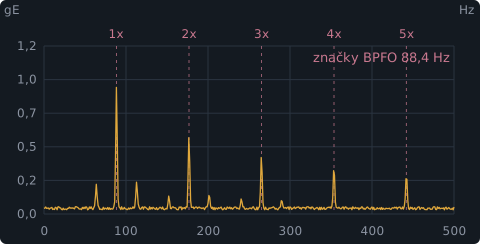
Measurement-point pages with static and dynamic data: an "all charts" view, cursors, waterfall spectra, speed detection, and bearing fault-frequency markers FTF, BSF, BPFO and BPFI shown directly in the spectrum.

  • Harmonics and sidebands
  • Bearing-to-measurement-point mapping

Standard-anchored limits

A standards catalogue in the backend holds ISO 20816-3 limits, ČSN 20 0065 limits for milling-machine spindle bores and ISO 14694 fan limits. In addition, custom standards with classes and A/B, B/C and C/D thresholds — assignable to a whole machine or to individual bearings.

  • ADASH DDS database limits as the source of truth
  • User overrides layered on top

AI-assisted assessment

Machine-level and measurement-point assessment with model selection. The application sends a bounded context — latest measurement, trend, limits, bearings, running speed, standard — and the AI provides the interpretation. Conclusions can be edited manually and remain in history.

  • Chat with the diagnostician over the machine card
  • Knowledge base only from manually approved examples

Adaptive EWMA limits

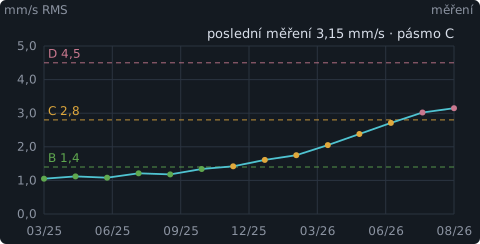
Recommended warning and alarm values are computed from the stored trend history using an exponentially weighted moving average. The proposal is always advisory only — you promote it into the manual limits with one button, and it never overrides the classification on its own.

  • EWMA parameters at the machine level
  • The final call stays with the diagnostician

PDF and DOCX reports

A report editor with customer and order fields, per-machine conclusions, recommendations, selected charts and per-chart comments. The preview is generated the same way as the final PDF, so what you see is what you download.

  • Export to a fully editable DOCX
  • Round-trip import only for conclusions and recommendations

Workflow

Six steps from the instrument to a delivered report

The workflow mirrors how a diagnostician actually works: data first, then limits, then interpretation, finally the document. Each step is independent, so you can go back without losing manual work.

STEP 01

Import the database

Add the .ndb database created in ADASH DDS (which stores measurements from the ADASH VA5 instrument) to the library. HADS reads the enterprise tree, machines and measurement points, including limits stored in the database.

STEP 02

Machine card and bearings

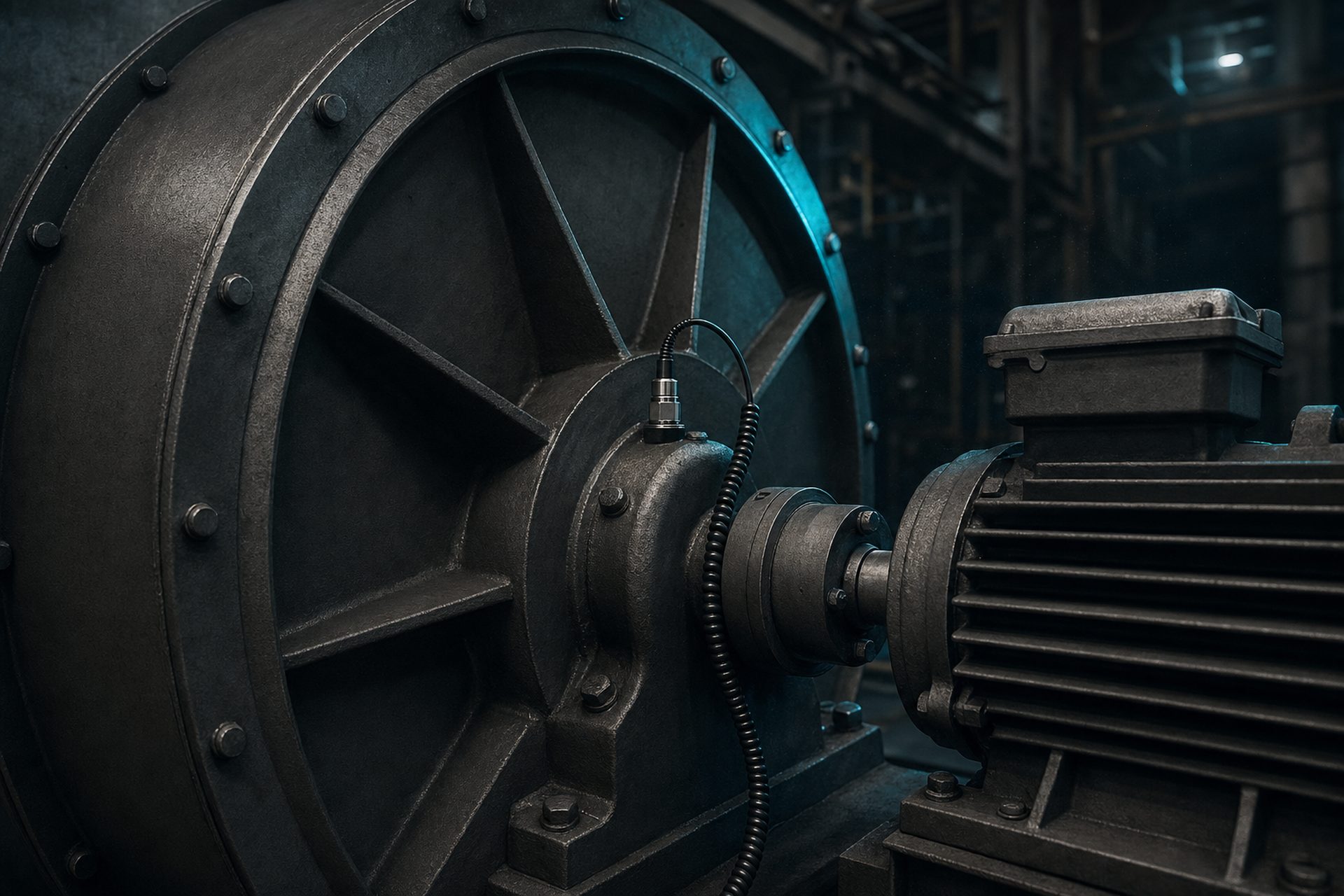
Fill in basic information, running speed and a machine image, and map bearings to measurement points. This activates FTF, BSF, BPFO and BPFI markers in the spectra.

STEP 03

Standards and limits

Pick the standard and machine class, or a custom standard. Adaptive EWMA proposals from the trend history can be promoted into the manual warning and alarm limits.

STEP 04

Analysis and AI assessment

Review spectra and trends, run a machine or point assessment, ask follow-up questions in the chat. The generated conclusion can be edited and saved — history is preserved.

STEP 05

Report assembly

Select the scope of machines in the editor, complete the cover page, pick trend and FFT charts, add per-chart comments and markers. Preview before download.

STEP 06

Delivery and review

Download a PDF named after the order and customer, or export DOCX for peer review. Only conclusions and recommendations are re-imported — measurements stay untouched.

Sample output reports

A report that drives a decision, not a data walk-through

The generated report starts with a management summary and an actions table. Detailed pages are produced only for problematic machines, and selected charts go into the appendix. Below are sample pages from all three report versions — the data shown is illustrative.

Illustrative layout of a report page

Tables in the mockup can be scrolled sideways on mobile.

Order 2026/0184
Customer: Teplárna Zlín, a.s.
Measured: 4 Aug 2026 · Diagnostician: L. Heisig

Vibration measurement report — summary

The subject of the measurement was 18 machines in the boiler-room and extraction systems. Measurements were taken with an ADASH VA5 instrument in operational state, evaluated according to ČSN ISO 20816-3, machine class per installation on a rigid foundation.

Management summary
11Zone A
4Zone B
2Zone C
1Zone D
Actions table
MachineWorst pointValueZoneStatusRecommended action
Extraction fan V-04VEN-2 envelope0.86 gE DAlarm Schedule bearing replacement within 14 days
Extraction fan V-04VEN-1 horizontal3.15 mm/s CWarning In-situ balancing of the impeller
Feedwater pump P-02PUM-1 vertical2.94 mm/s CWarning Check alignment and foundation tightening
Compressor K-01KOM-2 horizontal1.92 mm/s BOK Monitor in the next measurement cycle
Machine overview
MachinePointsMax velocityMax envelopeZoneTrend
Extraction fan V-0443.15 mm/s0.86 gEDworsening
Feedwater pump P-0242.94 mm/s0.21 gECstable
Compressor K-0141.92 mm/s0.18 gEBstable
Combustion air fan V-0141.14 mm/s0.09 gEAstable
HADS 1.30.1 · generated 10 Aug 2026 Page 1 / 6 · Report version 1

Real-world outputs from the application

Gallery of actual reports and screenshots

This is where actual HADS outputs are attached — screenshots and anonymised reports. Attachments are uploaded by the site administrator, with no need to touch the code.

No attachments yet. The administrator can add them any time via the admin panel below.

Standards and deployment

Standard-based limits, data on your side

Classification is driven by the standards catalogue in the application and limits from the ADASH DDS database. The application runs locally — the customer's database never leaves the machine.

Supported standards and limits

ČSN ISO 20816-3
A/B/C/D vibration severity classification for industrial machines, per class and mounting.
ISO 14694
Vibration limits for fans, per application category and mounting.
ČSN 20 0065
Vibration limits in the milling-machine spindle bore, used for machine-tool evaluation.
Custom standards
Global catalogue of custom standards with multiple classes and A/B, B/C and optional C/D thresholds. Assignable to a whole machine or to individual bearings.
ZoneMeaningReport status
ANew machines after commissioningOK
BAcceptable for long-term continuous operationOK
CUnsuitable for long-term operation, plan interventionWarning
DRisk of damage to the machineAlarm

Deployment and operation

LOCAL RUN WITHOUT PACKAGE INSTALLATION
The backend uses only the Python standard library plus prepackaged frontend assets. It runs on the diagnostician's Windows PC without dependency management.
DATA IN THE DATA/ DIRECTORY
Machine configuration, history, proposals, company data and report settings are stored under data/podniky/<enterprise-name>/.
SYNC BETWEEN TWO PCs
Per-enterprise storage lets two technicians work on different customers without conflicts. .ndb databases and local AI configuration are not synced.
AI KEYS STAY LOCAL
The distribution bundle ships only an empty configuration template. Actual keys stay on each machine and are excluded from sync.
SHARE THE DOCUMENT, NOT THE DATABASE
DOCX export allows peer review of a report without transferring large databases. Re-import never brings back measurements, limits, zones, charts or standards.

Book a pilot deployment on your own database

Send us a single .ndb database or block off an hour for an online walkthrough. During the pilot we will go through your machines with you, set up standards and limits, and generate a report in your visual identity.

  • Two weeks on your database, on your computer
  • Set-up of standards, machine classes and bearings for one plant
  • One finished report in PDF and DOCX at the end of the pilot